

Change file date/time with Attribute Manager.

|
Flexible changing of the file's attributes, date and time stamps. |
Source files:
file name Modified Created
pict01.jpg 15.10.2003 0:06:14 23.06.2004 16:10:04
pict02.jpg 15.10.2003 0:06:14 23.06.2004 16:10:04
pict03.jpg 15.10.2003 0:06:14 23.06.2004 16:10:04
pict04.jpg 15.10.2003 0:06:14 23.06.2004 16:10:04
pict05.jpg 15.10.2003 0:06:14 23.06.2004 16:10:04
Step 1:
Select files in list view, use Ctrl button with mouse click to select more then one file. If you want to select all files click select all in the menu
[File], or click button select All ( )
on the tool bar. If you need unselect all files, click unselect all in the menu [File], or click button unselect All (
)
on the tool bar. If you need unselect all files, click unselect all in the menu [File], or click button unselect All ( ) on the tool bar.
Step 2:
Click on the parts of the date box and time box, change value manually from the keyboard. For example set 07.07.2004 (date) and 0:00:00 (time). You can see this example on the picture.
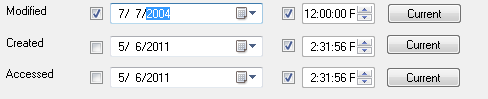
| Note: To change date time options you need to set check box "Change date and time" on the Attributes tab. |
Step 3:
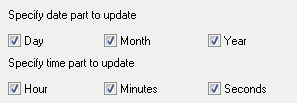
Customize date and time options click tab "Date Time Mask". Set options like on the picture.
Step 4:
Click menu [File] change file attributes, or click change file attribute button ( ) on the tool bar.
Result:
file name Modified Created
pict01.jpg 07.07.2004 0:00:00 23.06.2004 16:10:04
pict02.jpg 07.07.2004 0:00:00 23.06.2004 16:10:04
pict03.jpg 07.07.2004 0:00:00 23.06.2004 16:10:04
pict04.jpg 07.07.2004 0:00:00 23.06.2004 16:10:04
pict05.jpg 07.07.2004 0:00:00 23.06.2004 16:10:04


| www.miklsoft.com |
Term of use
Privacy Policy
|