

Tour of the Attribute Manager Interface

|
Flexible changing of the file's attributes, date and time stamps. |
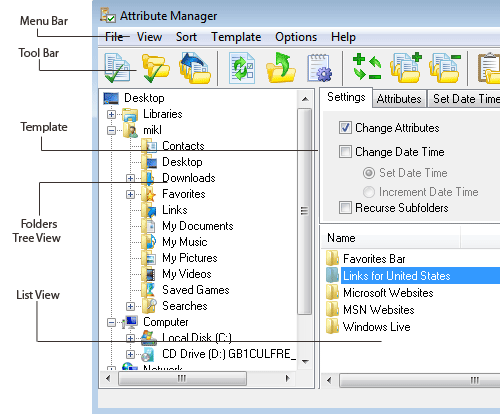
Main screen capture
File Manager window screen capture. You can use file manager for files and folders navigation, managing their attributes, select them for attribute changing. Also there you can set template for batch attributes changing.
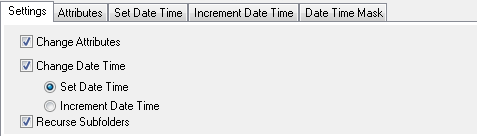
Settings Template screen capture
Set template settings to change attributes, dates and processing subfolders.
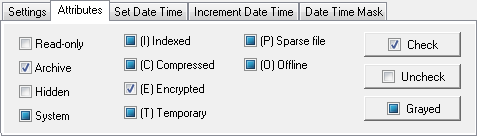
Attributes Template screen capture
Set template to change Read-only, Archive, Hidden, System, Indexed, Compressed, Encrypted, Temporary, Sparse file, Offline attributes for batch changing.
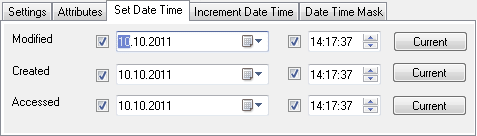
Set Date Time Template screen capture
Set custom date and time values for the Created, Modified and Accessed date time.
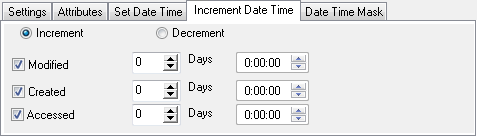
Increment Date Time Template screen capture
Set increment or decrement parameters for the Created, Modified and Accessed date and time.
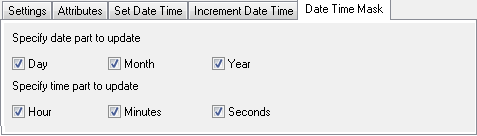
Date Time Mask Template screen capture
Set partially date time changing (for example, year only, preserving month and date).
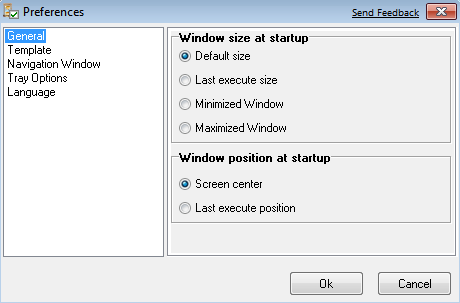
Preferences Dialog screen capture
Preferences window screen capture. This dialog is designed for program's customization, to make your work more comfortable.


| www.miklsoft.com |
Term of use
Privacy Policy
|