

Attribute Manager Using File menu

|
Flexible changing of the file's attributes, date and time stamps. |
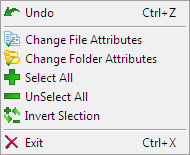
File menu consist:
- Undo - is canceling last operation. Also you can use shortcut Ctrl + Z.
- Change file attributes - open Dialog for changing file attributes and file date time stamps.
- Change folder attributes - open Dialog for changing folder attributes and folder date time stamps.
- Select All - select all files and folders in the List View window.
- UnSelect All - unselect all files and folders in the List View window.
- Exit - exit from the program. Also you can use shortcut Ctrl + X.


| www.miklsoft.com |
Term of use
Privacy Policy
|