

Attribute Manager Help Center

|
Flexible changing of the file's attributes, date and time stamps. |
Help Content
- Overview
- Interface
- Template
- General Preferences
- How To Change File or Folder Attributes
- How To Change File or Folder date/time
- How to Increment and Decrement Date Time
- Registering your copy
- Why should I register?
- LICENSE AGREEMENT
Overview
Ever need to change attributes (date and time of their creation etc.) of files and folders? Quickly? As you know, with Windows it's tedious and slow. Not so with Attribute Manager! Attribute Manager allows you to change Read-Only, Hidden, System and Archive, Encrypted, Compressed, Temporary, Indexed, Sparse, Offline attributes. You can change the date and time of creation, last access, last modification of files and folders. Attribute Manager uses templates that allow you to configure changes and apply them to an unlimited number of files and folders. The program is easy to use and supports a multi-lingual user interface.
Interface
Window screen capture of the Attribute Manager shows main parts of the usage interface. You can use manager for files and folders navigation, managing their attributes, select them for attribute changing. Also there can set the template for batch attributes changing.
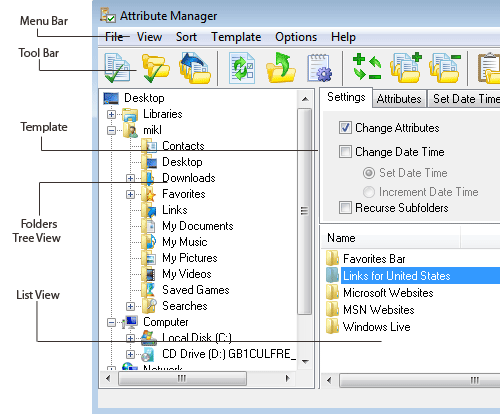
Using the Menus
You can display menu commands using the following methods:
- Clicking the menu in the Menu bar, or
- Pressing the <Alt> key plus the underlined letter in the menu's title. For example, to display the File menu, press <Alt> + <F>.
You can select or execute a menu command using the following methods:
- Clicking the item in the menu,
- Pressing the <Alt> key plus the underlined letter in the menu's title, and then pressing the letter underlined in the menu item. For example, to select the menu item File > Change File Attributes, press <Alt> + <F> + <C>, or
- Using the arrow keys to highlight a menu item, and then pressing the Enter key.
Toolbar
The toolbars provide buttons that access some of the frequently used commands in the menus. To activate a command, click its toolbar button.
 |
Change file attributes | Change file attributes and file date-time stamps. |
 |
Change folder attributes | Changing folder attributes and folder date-time stamps. |
 |
Undo | Cancel last operation. |
 |
Refresh | Refresh navigation panel. |
 |
Back | One folder level up in the navigation panel. |
 |
View Detail Info | Show the detail information about selected file, or folder. |
 |
Invert Selection | Invert selection files and folders in the List View window. |
 |
Select All | Select all files and folders in the List View window. |
 |
UnSelect All | UnSelect all files and folders in the List View window. |
 |
Open Template | Open preset template for use. |
 |
Save Template | Save current template. |
 |
Manage Templates | Remove or rename templates, change their order. |
 |
Options | Open preferences dialog. |
 |
Help | Show this help. |
Using the Folders Tree View
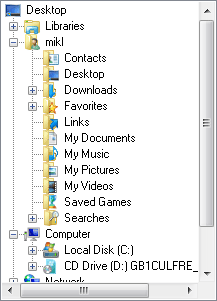
Tree View founded on the Windows shell API, and it looks like tree view in a standard windows explorer. You can select a folder by a click on it in folder tree view. If you need to work with files or folders at an up level, you may click (Back) button on the toolbar. To extract, you must double-click on a folder, or just click on a plus symbol near the folder.
Another way is to use arrows key. If you need to work with files or folders at an up level, you may press backspace button on the keyboard. To extract or collapse use right and left arrows.
Using the List View
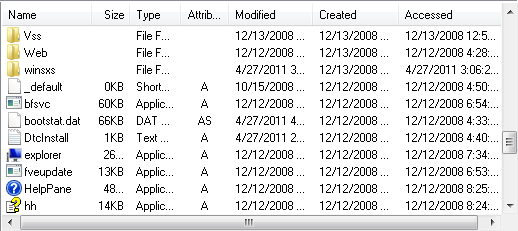
List View founded on the Windows shell API, and it looks like list view in a standard windows explorer. You can select a folder by a click on it in folder tree view. If you need to work with files or folders at an up level, you may click (Back) button on the toolbar.
Another way is to use arrows key. If you need to work with files or folders at an up level, you may press backspace button on the keyboard. To extract or collapse use right and left arrows.
You can select view mode, for it clicks in the menu bar [View] and selects view mode: large icons, small icons, list or details.
To use sort functions click in the menu bar [Sort] and then selects the method of sorting: name, type, size, modified, attributes. If you use details view mode, you can change sorting by clicking heard of the column in the list view.
Template
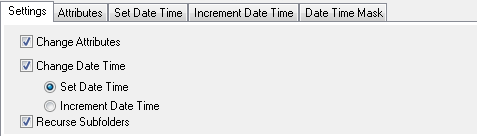
Set template settings to change attributes, dates and processing subfolders. To change file attributes set checkbox Attributes. If you need to modify date and time you should check "Change Date Time". Then select changing type: Set new date time or increment(decrement) current date time. Recurse Subfolders - set this option if you need to process subfolders.
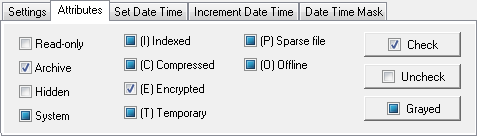
Attributes Template
Set template to change Read-only, Archive, Hidden, System, Indexed, Compressed, Encrypted, Temporary, Sparse file, Offline attributes for batch changing.
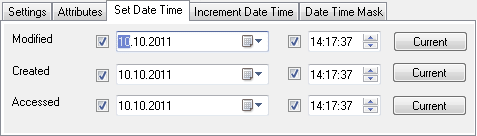
Set Date Time Template
Set custom date and time values for the Created, Modified and Accessed date time.
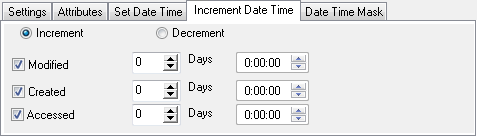
Increment Date Time Template
Set increment or decrement parameters for the Created, Modified and Accessed date and time.
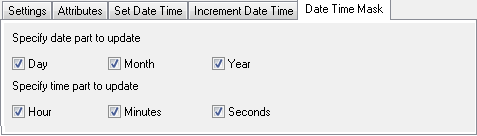
Date Time Mask Template
Set partially date time changing (for example, year only, preserving month and date).
General Preferences
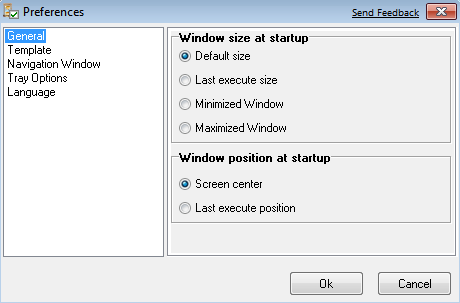
In this dialog, you can set window size and position preferences, at the startup.
Window size at startup:
- Default size - default window's size at the program startup;
- Last execute size - at startup, the size of a window will be the same as at last running the program;
- Minimized window - at startup main program window will be minimized;
- Maximized window - at startup main program window will be maximized.
Window position at startup:
- Screen center - if this option checked, program will startup at the center of the screen;
- Last execute position - if this option checked, the program would start up in the same location as at last running the program.
To open this dialog click [Options] in the main menu, then select
and click "General". Another way is to click the icon
()
on the toolbar and select "General".
Template Preferences
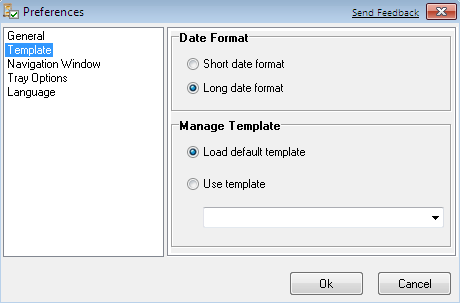
Date format
- Short date format - set short date format in the template
- Long date format - set long date format in the template
Template Adjustments
- Use default template - set this option to open the template with the default adjustments.
- Use Template - select this option and then select a template by expanding select box, which you want to use at the template opening.
To open this dialog click [Options] in the main menu, then select
and click "Preferences". Another way is to click the icon
()
on the toolbar and select "Preferences".
Navigation Window Preferences
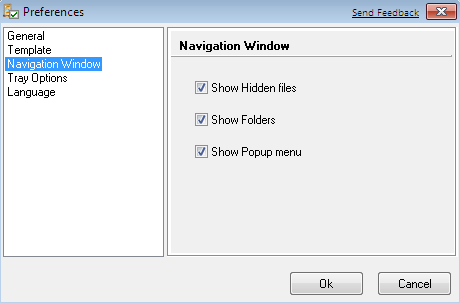
Navigation Window provides following options:
- show hidden files - if you set this option, list view will show hidden files;
- show folders - if you set this option, list view will show folders;
- show popup menu - if you set this option, a popup menu will be available by right mouse button click.
To open this dialog click [Options] in the main menu, then select
and click "Navigation Window". Another way is to click the icon
()
on the toolbar and select "Navigation Window".
Tray Preferences
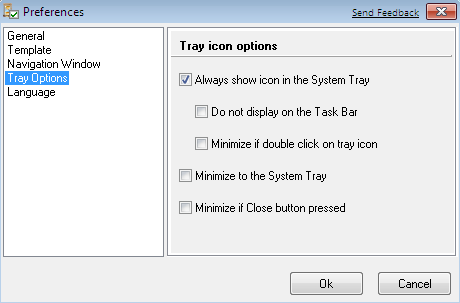
- Always show icon in the System Tray - naturally Attribute Manager icon will be permanently displayed in the System Tray.
- Do not display program icon on the Task Bar - Attribute Manager window will not show the rest of the minimized/open windows on the Task Bar.
- Minimize if double click on tray icon - if program active and you double click on tray icon, the program will be minimized.
- Minimise to the System Tray - this will minimize the application to the System Tray, and it will not show. However, the small icon indication that the program is running will be invoked automatically.
- Minimize if Close button pressed - this option allows you to minimize application if you press the Close button.
To open this dialog click [Options] in the main menu, then select
and click "Tray Options". Another way is to click the icon
()
on the toolbar and select "Tray Options".
Language Preferences
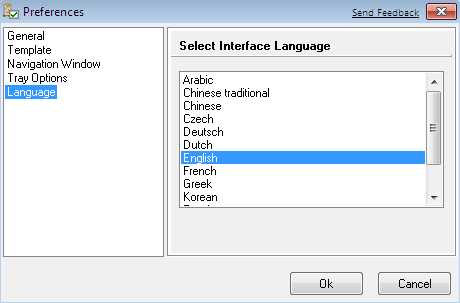
This window allows you to set program interface language. Just select a language in the "Select Interface Language" menu and click Ok button.
To open this dialog click [Options] in the main menu, then select
and click "Language". Another way is to click the icon
()
on the toolbar and select "Language".
How To Change File or Folder Attributes
Source files:
file name Attr
pict01.jpg --a-
pict02.jpg --a-
pict03.jpg --a-
pict04.jpg --a-
pict05.jpg --a-
Step 1:
Select files in list view, use Ctrl button with a mouse click to select more
than one file. If you want to select, all files click select all in the menu
[File], or click button select All ()
on the toolbar. If you need to unselect all files, click Unselect all in the menu [File], or
click button unselect All ()
on the toolbar.
Step 2:
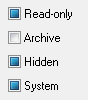
Set attributes (Read-only - gray, Archive - unset, Hidden - gray, System - gray), set them, like the picture:
Step 3:
Click menu [File] change file attributes, or click change file attribute
button ()
on the toolbar. For Folders:
Click menu [File] change folder attributes, or click change folder attribute
button ()
on the toolbar.
Result:
file name Attr
pict01.jpg ----
pict02.jpg ----
pict03.jpg ----
pict04.jpg ----
pict05.jpg ----
How To Change File or Folder date/time
Source files:
file name Modified Created
pict01.jpg 15.10.2003 0:06:14 23.06.2004 16:10:04
pict02.jpg 15.10.2003 0:06:14 23.06.2004 16:10:04
pict03.jpg 15.10.2003 0:06:14 23.06.2004 16:10:04
pict04.jpg 15.10.2003 0:06:14 23.06.2004 16:10:04
pict05.jpg 15.10.2003 0:06:14 23.06.2004 16:10:04
Step 1:
Select files in list view, use Ctrl button with a mouse click to select more than
one file. If you want to select, all files click select all in the menu [File],
or click button select All () on the toolbar. If you need
to unselect all files, click Unselect all in the menu [File], or click button
unselect All () on the toolbar.
Step 2:
Click on the parts of the date box and time box, change the value manually from the keyboard. For example set 07.07.2004 (date) and 0:00:00 (time), as shown in the image.
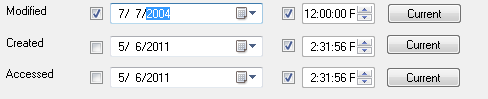
| Note: To change date time options you need to set checkbox "Change date and time" on the Attributes tab. |
Step 3:
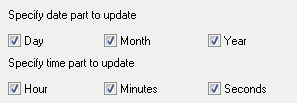
Customize date and time options click the tab "Date Time Mask". Set options like the picture.
Step 4:
Click menu [File] change file attributes, or click change file attribute button () on the toolbar.
For folders: Click menu [File] change folder attributes, or click change folder attribute
button ()
on the toolbar.
Result:
file name Modified Created
pict01.jpg 07.07.2004 0:00:00 23.06.2004 16:10:04
pict02.jpg 07.07.2004 0:00:00 23.06.2004 16:10:04
pict03.jpg 07.07.2004 0:00:00 23.06.2004 16:10:04
pict04.jpg 07.07.2004 0:00:00 23.06.2004 16:10:04
pict05.jpg 07.07.2004 0:00:00 23.06.2004 16:10:04
How to Increment and Decrement Date Time.
Source files:
file name Modified Created
pict01.jpg 15.10.2003 0:06:14 23.06.2004 16:10:04
pict02.jpg 15.10.2003 0:06:14 23.06.2004 16:10:04
pict03.jpg 15.10.2003 0:06:14 23.06.2004 16:10:04
pict04.jpg 15.10.2003 0:06:14 23.06.2004 16:10:04
pict05.jpg 15.10.2003 0:06:14 23.06.2004 16:10:04
Step 1:
Select files in list view, use Ctrl button with a mouse click to select more than one file.
If you want to select, all files click select all in the menu [File], or click button select
All () on the toolbar. If you need to unselect all files, click
Unselect all in the menu [File], or click button unselect All () on the toolbar.
Step 2:
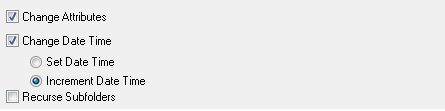
Set check box Change Date Time, select "Increment date time" on the tab Attributes.
Step 3:
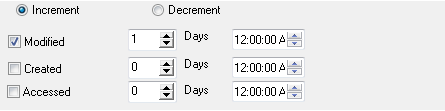
Uncheck Created and Accessed, set one day for increment, like on the picture.
Step 4:
Click menu [File] change file attributes, or click change file attribute button () on the toolbar.
Result:
file name Modified Created
pict01.jpg 16.10.2003 0:06:14 23.06.2004 16:10:04
pict02.jpg 16.10.2003 0:06:14 23.06.2004 16:10:04
pict03.jpg 16.10.2003 0:06:14 23.06.2004 16:10:04
pict04.jpg 16.10.2003 0:06:14 23.06.2004 16:10:04
pict05.jpg 16.10.2003 0:06:14 23.06.2004 16:10:04
Registering your copy
If you intend to use Attribute Manager after the trial period of 10 days, you must register your copy of Attribute Manager or stop using it. When you register Attribute Manager, you are eligible to receive Technical support from Attribute Manager support team.
Note: If you are a user at a location where there is a valid site license, you do not need to register. Contact your organization's administrator for support.
To get the latest license prices and register your copy on-line using a credit card, please visit Attribute Manager official WWW home page located at http://www.miklsoft.com/attrman/ or contact Attribute Manager support team via e-mail at support@miklsoft.com
If you are part of a business and wish to use several copies of this product within your company, greatly reduced site licensing rates are also available. For more information please contact our sales department at sales@miklsoft.com
To purchase the product, please visit Registration section of our Web site at http://www.miklsoft.com/registration.html. After purchasing you will receive a registration key via email.
Finally, by registering the software, you provide us with the resources and incentive to support the software with updates and to develop additional quality products in the future.
Web-site: http://www.miklsoft.com E-mail: sales@miklsoft.com
Why should I register?
For many people, the most pressing reason to register is to get rid of the annoying nag box which pops up at the most inconvenient times.
But besides this, registration entitles you to receive technical support and minor upgrades to the software for free. Registration may also entitle you to discounts on new software releases from our company. We will also send you information bulletins by email to let you know about what's happening with our products.
Finally, by registering the software, you provide us with the resources and incentive to support the software with updates and to develop additional quality products in the future.
LICENSE AGREEMENT
This user license agreement (the "AGREEMENT") is an agreement between you (individual or a single entity) and MIKLSOFT, for the MIKLSOFT software (the "SOFTWARE") that is accompanying this AGREEMENT.
The SOFTWARE is the property of MIKLSOFT and protected by copyright laws and international copyright treaties. The SOFTWARE is not sold; it is licensed.
TRIAL VERSION
If you accept the terms and conditions of this AGREEMENT, you have certain rights and obligations as follow:
YOU MAY:
- Install and use an unlimited number of copies the TRIAL VERSION for 10 days.
- Use one or more copies of the TRIAL VERSION for evaluation purpose only.
- Copy and distribute the TRIAL VERSION freely (see 'DISTRIBUTION').
YOU MAY NOT:
- Sublicense, rent or lease the TRIAL VERSION or any portion of it.
- Decompile, disassemble, reverse engineer or modify the TRIAL VERSION or any portion of it.
- Use the TRIAL VERSION after your trial period of 10 days.
DISTRIBUTION:
You are hereby to make as many copies of the TRIAL VERSION as you wish and distribute it to anyone provided that all files are intact. You must distribute the install form of the TRIAL VERSION (not the files resulting of an installation). You are not allowed to sell the TRIAL VERSION (except for shipment and handling charges). Computer's Magazines are authorized to distribute it on any Cover Disk or CD-ROM without any permission. Please inform us by e-mail each time you distribute the TRIAL VERSION.
WARRANTY DISCLAIMER:
The SOFTWARE is supplied "AS IS". MIKLSOFT disclaims all warranties, expressed or implied, including, without limitation, the warranties of merchantability and fitness for any purpose. The user must assume the entire risk of using the SOFTWARE.
DISCLAIMER OF DAMAGES
MIKLSOFT assumes no liability for damages, direct or consequential, which may result from the use of the SOFTWARE, even if MIKLSOFT advised of the possibility of such damages. Any liability of the seller will be limited to refund the purchase price.
| www.miklsoft.com |
Term of use
Privacy Policy
|