

About Tray Preferences

|
Flexible changing of the file's attributes, date and time stamps. |
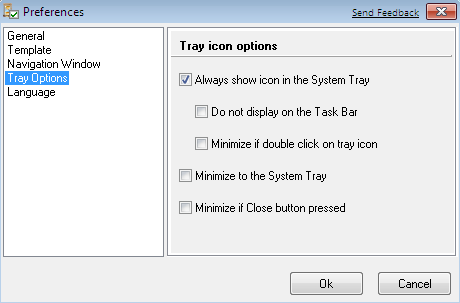
- Always show icon in the System Tray - naturally Attribute Manager icon will be permanently displayed in the System Tray.
- Do not display program icon on the Task Bar - Attribute Manager window will not be seen among the rest of the minimised/open windows on the Task Bar.
- Minimize if double click on tray icon - if program active and you double click on tray icon, program will be minimized.
- Minimise to the System Tray - this will minimise Attribute Manager to the System Tray and it will not be seen, however the small icon indication that the programme is running will be invoked automatically.
- Minimize if Close button pressed - this option allow you to minimize program, if you press Close button.
In this dialog you can set window size and position preferences, at the startup.
To open this dialog click [Options] in main menu, then select
and click "Tray Options". Another way is to click icon ( ) on the tool
bar and select "Tray Options".
) on the tool
bar and select "Tray Options".


| www.miklsoft.com |
Term of use
Privacy Policy
|