

Data Grid

|
Passwords Base will keep all your passwords in safety. |
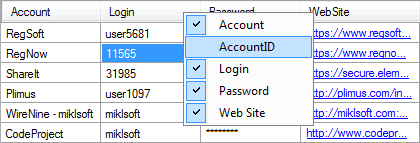
Data Grid shows all informations about your accounts. If you need some cell data, use mouse click over it. When you select any cell, it's data coping to the clipboard. You can disable any columns from the data grid, just click right mouse button over the columns header and uncheck unnecessary column in the dropdown menu.
Note: If you disable any column from the dropdown menu, after program restart it will enabled. For stable disabling use options dialog. |


| www.miklsoft.com |
Term of use
Privacy Policy
|