

System Tray

|
Passwords Base will keep all your passwords in safety. |
 By default program put icon into the system tray.
Double click on icon show or hide application window.
Right mouse click on icon shows tray menu.
By default program put icon into the system tray.
Double click on icon show or hide application window.
Right mouse click on icon shows tray menu.
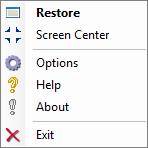
Hide/Restore - hide or show program window on the desktop.
Screen Center - set program window position to the center of the desktop.
Options - Opens dialog, that is designed for program's customization to your needs.
Help - Displays the help contents.
About - Showing about program dialog.
Exit - close application.


| www.miklsoft.com |
Term of use
Privacy Policy
|