

Professional Renamer Tree View

|
A powerful tool to rename multiple filenames at once. |
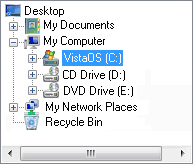
The Tree view is a view of all the drives and folders on the computer. For each folder which itself contains folders, there is the option as to whether to display these child folders. If such a folder is closed, then the children are not displayed, if opened, then the children are listed immediately below their parent.
The folders in the Tree View include:
- Desktop, which is the top of the tree. Its child folders include My Documents, and My Computer.
- My Documents.
- My Computer, whose children include all the drives on the computer, eg the floppy drive and your hard drive.
Navigating the tree
- As for any list, you can use these keys: UP and DOWN ARROW, HOME and END, and the first letter of the folder or drive you want to find.
- LEFT ARROW has two uses: if you're focussed on an open folder, it closes it; else it moves you up the list to the parent folder.
- RIGHT ARROW also has two uses: if you're focussed on a closed folder, it opens it; else if you you're focussed on an open folder, it moves you down to the first child folder.


| www.miklsoft.com |
Term of use
Privacy Policy
|