

Professional Renamer Combo box Date

|
A powerful tool to rename multiple filenames at once. |
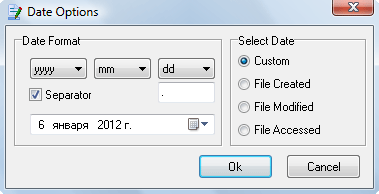
This dialog allows you to manage Date options.
Date format - allow you to set date and specify its format.
Set year format:
- yyyy - 2005
- yy - 05
Set month format:
- m - 9
- mm - 09
- mmm - Sep
- mmmm - September
Set day format:
- d - 5
- dd - 05
- ddd - Thu
- dddd - Thursday
Select date - allow you to specify what kind of date to insert.
- Individual - date which is selected by your self.
- File Created - file creation date.
- File modified - last modification date.
- File Accessed - last file access date.


| www.miklsoft.com |
Term of use
Privacy Policy
|