

PHOTO EXIF MANAGER 3.15

|
View and edit all well-known digital photo EXIF tags. |
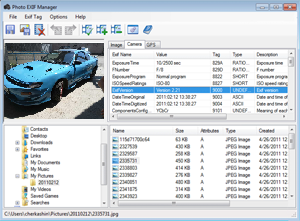
This is a software tool that lets you read and edit EXIF tags of many well-known cameras.
Photo EXIF Manager lets you view and edit most well-known digital photo EXIF tags. The edit capability extends to the more recent GPS tags too. All tags are listed in a table, and grouped into three main groups Image, Camera and GPS. EXIF 2.3 standard tags are supported. Editing is done easily. Double-clicking on a tag opens the edit dialog. This dialog box displays information about the tag and its editing tools. You can add, edit, delete some tags, or remove all tags. This software tool allows you to navigate the directory structure quite easily; the navigation is similar to the familiar Windows explorer. The preview area lets you view the photo.
The interface is quite intuitive and simple to use. The interface is well laid out, making it easy to use; even a complete beginner should be able to start using it quickly. Beside the preview area, there is the file exploration area right below it. On the right of the preview area is the display area for the tags. Below this area is the batch list of the photos being processed at this time. The EXIF area shows the tags and the values in each of them. This is quite a good product. If you needed a tool for updating EXIF tags of the photos in your collection then this is something you ought to try out.
Photo EXIF Manager features:
- support EXIF 2.3 standard tags.
- easy file navigation.
- Import/export exif tags.
- GPS tags editing.
- edit all kind of tags.
- EXIF orientated image preview.
- remove all EXIF tags.
Photo EXIF Manager supports following exif types: BYTE (8-bit unsigned int), ASCII (8 bit ASCII code), SHORT (16-bit unsigned int), LONG (32-bit unsigned int), RATIONAL (Two LONGs, unsigned), UNDEFINED (8-bit), SLONG (32-bit int), SRATIONAL (Two SLONGs, signed).
System requirements: Windows PC, Framework .Net 4.0.
Trial limitations: 10-day trial period, nag-screen.
 exe
exe| www.miklsoft.com |
Term of use
Privacy Policy
|