

PROFESSIONAL RENAMER 3.95

|
Powerful renaming tool to rename multiple filenames at once. |
Welcome to MIKLSOFT Professional Renamer
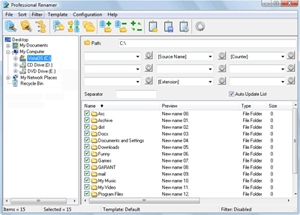
Rename files and folders with Professional Renamer. Its user-friendly and intuitive interface allows you to rename files and folders easily. Unique templates system will helpfully assist you in making up new names. All changes on new name immediately appear in the files list, what allow you to see the result before renaming. Put in good order your mp3 collection and photo archive, by adding date, time and counter to its names.
With Professional Renamer, you can
- rename mass of files.
- rename mass of folders.
- process subfolders to rename files or folders.
- view preview before rename.
- navigate through folders tree view.
- save renaming template.
- import/export renaming patterns.
- cataloging your photo and mp3 collection.
- Uppercase/lowercase.
- add counter to a new name.
- find and replace function.
- change file extensions.
- insert creation/modification/access/current time & date
- filtering list of files.
- include/exclude folders in the file list.
About the Professional Renamer Visual Templates
The system of visual templates allows applying different name patterns to every file or folder type. One name pattern can include up to nine fields with the user-set separators in between. Each field in its turn carries a variety of attributes like source name, date, time, counter, user string, etc. The attributes are set through dialogues that avail users of a choice of parameters. For instance, time can form a part of a name string as a one- or two-digit value and allows a choice between the time of creation, modification, last access or any other user-set value. The same flexibility is in every attribute dialogue. The unique pattern thus created will be saved as a reusable template or exported into a file. The system of visual templates extends the range of available renaming options and provides additional consistency of name patterns.
About the Professional Renamer interface
The intuitive clarity of the program's interface aims at easier and faster renaming. The three-panel window allows moving through system folders, editing templates, and addressing the changes to file names at the same time. A comfortable toolbar and a status bar complement the pleasure of operating the program.
Professional Renamer features:
- Multiple files renaming.
- Multiple folders renaming.
- Unique visual templates system.
- Subfolders processing.
- New names preview.
- Files sorting and filtering.
- Multiple usages of the templates (import/export).
System requirements: Windows PC.
Trial limitations: 10-day trial period, nag-screen.
Download Professional Renamer (0.9 MB):
 exe
zip
exe
zip
Comments from others:
You did really a great job! The new version of Professional Renamer is beautiful and easy to use. The new interface is a great improvement, especially the tick boxes and the preview column. This type of tools is really my favorites... John Kerstholt
Press room:
| www.miklsoft.com |
Term of use
Privacy Policy
|